Sitecore tips and tricks and community news !

Post Top Ad

Post Top Ad

Showing posts with label entity. Show all posts
11:57 AM

xCommerce Extending 2/3 - Policies


At this point we already have known general overview of ways which are possible to extend or customize xCommerce. We did extension of an entity via xCommerce composer tool. But we also have mentioned that there are ways to customize platform from code. We saw 2 main ways, by Policies and Composition, what means the best way - to create independent plugins.

Let's take a look on both of them.

At the beginning what you need is:

Sitecore Commerce Engine SDK, example:


1. Policies

By definition:

A named, versionable and variable set of data that can be used as facts within behaviors to influence behavioral outcomes. source

Policies is the simplest I think approach, but we should avoid using it. Why? Because it has an influence on internal xCommerce code, which can be changed e.g during upgrade. To have less stress and work we shouldn't touch internal xCommerce thing but extend it via composition approach.

Policies you can find in this place inside the SDK solution


Let's assume that we would like to extend our Customer entity. What we should to do is to find this entity in policies and add your custom field.


Yes, we did it! we have added a new property! Is it enough?
- Well, not exactly. We still need create a way to make it visibile outside.

But how to do that?

You still (like in a composition) create you feature project (plugin) and define there a few elements of your change. But...it's still less work than in composition. Usually, needed for you would be , command and controller. In policies like in composition approach your are adding new properties of entity as a new components. Difference is that, when you are changing policy this components are higher in hierarchy of childviews of your entity and you don't have to do much, to later gets them in Sitecore.
By composition approach those components will be buried much more lower to get it.

Now we understand that we have to think about chain of commands and controllers which uses it in xCommerce and extend those places with our custom property. Hence you have to think where you should to go to. To make it very useful is DotPeek, where you can find whole process flow.

Some custom command to make possible to get it like:


And a controller:
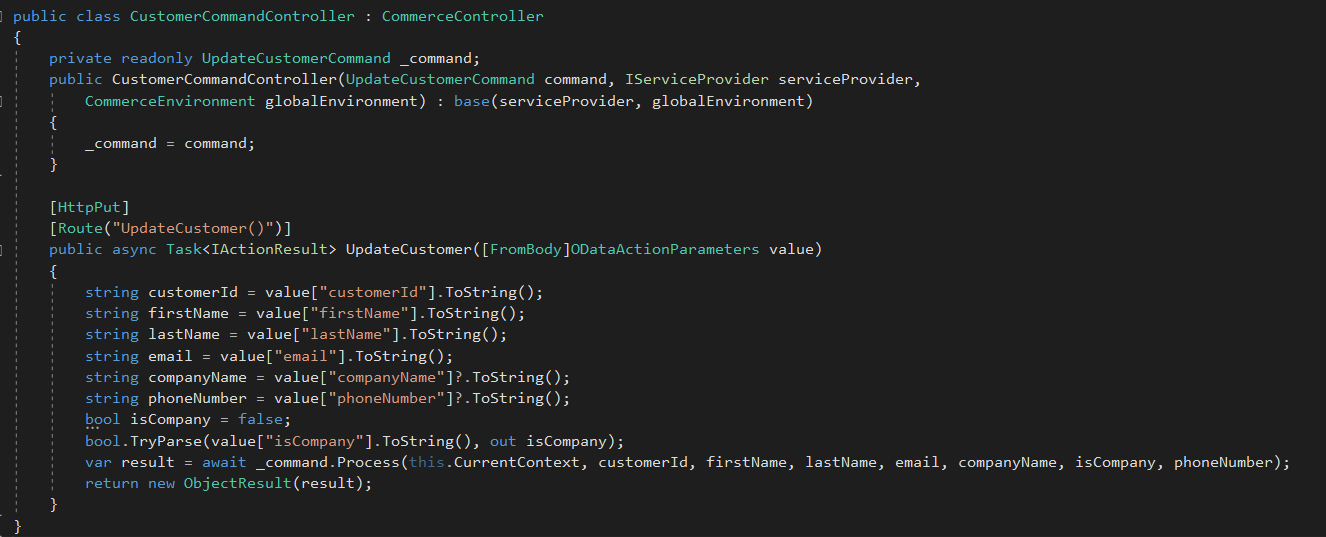

So we can say that xComerce part is done. Now we have to go to Sitecore side and try to receive new parameters.

Sitecore side:

Depend what your are doing, in our case it's customer so let's check registration controller which we use and would like to extend with custom fields. In our scenario is our custom controller written with some changes, which gets custom properties pushed by xCommerce in Customer component.


That's it. It's much more faster way to achieve customization of xCommerce entity - but remember that you are changing internal commerce files ! :)

Cheers!



12:06 PM

xCommerce Extending 1/3 - Overview

When we are working with Experience Commerce usually we are using SXA, CXA and entities already prepared for us by authors of this environment. It's a very pleasure way to build our solution with components which are out of the box.

But we have sometimes situation that our business requirement needs custom things like additional fields in forms or other places. In general, it needs to put own custom data inside already defined entities.

So what to do in this situation?

1. Code approaches

  • Composition
    • Entities can be extended by adding components to the Components property on the entity.
    • Components are just classes that are injected into the entity by a plugins with pipeline and blocks
    • It's a independent way to add something more, without relation to other plugin or other elements.
  • Policies
    • In simple understanding we can treat Policy like a config or setting file in some way. You can for instance add a new field for the customer entity etc.
2. UI approach - Composer

Since Sitecore Experience Commerce 9.0.2 is available new feature called "Composer". It's a tool which allow you to extend some entities from UI Dashboard

Let's take a look

1. At the beginning you are going to.... Merchandising tool , not composer ;). In that place you can create a new version of the entity

 2. After creation new version of entity you have unlocked rest of context menu, where you are able to create a new view for this entity


3.When you already have a new view, you can add a new property for this view to fill it. You can define there a name, but moreover a type. In this example I put string, but besides that you have:
  • DateTime
  • Decimal
  • Integer
  • Boolean


 4. Since we have already done new view with the property, we have to extract our custom view to a template, to share it e.g. for all sellable items. To make it we have special action in our context menu. Take a look:


5. Until now, when we did our template we should go to composer menu in xCommerce to manage this new 'item'.


6. When we click it and go inside we will see a new panel. It has also 3 additional button on the right side. There are actions which help you to use and share your custom view. They consist actions:
  • Manage Tags
  • Link to entity
  • Associate Items definitions

At the end, composer is a great tool when you need to add some custom properties especially in situation when you will use it later in this xCommerce dashboard.

But if you are looking more sophisticated solutions, check the next post, where you can find information about extending xCommerce from code perspective.

Cheers!