Sitecore tips and tricks and community news !

Post Top Ad

Post Top Ad

Showing posts with label Experience. Show all posts
12:30 PM

Sitecore xCommerce product items lose composer templates


When we are using xCommerce we have products representation from xCommerce also on Sitecore side. You can see this products as an items with whole description as it usual has. There is also field describing template of an particular item. It should indicate to the product xCommerce template. 

In our scenario we had custom product templates because of our custom composers. Hence in Sitecore we see this custom templates as a definition of particular product (it consist custom product fields inside).


Issue

However, from time to time, randomly, this templates just... disappear. Since that moment Sitecore recognize this products as a default ones, described by default xCommerce product template.

That cause the issue with indexing, because custom fields weren't seen and indexed. What mean disaster for proper working application.

Walkaround

As a walkaround you can clear Commerce cache which push Sitecore to refresh xCommerce templates and get proper one. 


Unfortunately it doesn't mean it will work since that moment to infinity ;) It can broke one more time randomly.

So what we can do?


Solution

It's connected with CatalogRepository.CheckTemplatesMapping() method. When commerce items are loading this method is started.


After instance is restarted, when commerce items are loaded from Content Editor (when we navigate to catalog items in Content Editor) then Context.ContentDatabase is not null and there is possibility to load information about custom composer templates. 


But, if we open commerce items on Storefront after instance was restarted, before they are opened in Content Editor,  Context.ContentDatabase is null on Storefront. 
Hence, correct composer templates are not possible to load. 


Solution is to open CE and set up in path '/sitecore/content/<StorefrontTenant>/<Storefront>/Settings/Site Grouping/Storefront' new property "content" to 'Other properties' with "master" value. 


That will give us always filled database context.

Thanks !

5:26 PM

Sitecore xCommerce Crawlers and Strategies optimization (9.0.3)


Hello,


Last time I had a chance to check search engine in project with xCommerce. Its main responsibility is to collect products and it is based on SOLR services. During checking it, appeared the issue. When the SOLR engine started to indexing products which we had in DB it has eaten whole VM resources and after some time it just hang out. 

Now all of us can say - but why? 

Well it's really the best question we can ask (and the easier one), but unfortunately answer is not so easy to find. To find answer we can start with checking crawling process made by crawlers or strategies

Crawling you say? - Well, yes.


Details:

To be precise: we were working with Sitecore 9.0.2 + SXA 1.8 + xCommerce 9.0.3. We were using commerce API to add products from the external system and in general, it works fine. What we discovered is the difference in indexing implementation between Crawlers which are triggered manually and Strategies which work in the background. As a result, we see differences in SOLR results.

> Strategy that we use is: SellableItemsIntervalAsynchronousStrategy
> Crawler:
AllCatalogItemsCrawler.

What is the gap? 


Well, when the strategy is fired up after the product import we see in SOLR many documents of the same product in the same language, like 30, 60 which has the same SitecoreId but different paths with "/[orphan]" as a root. We also figured out that Commerce keeps the same amount of entities in Mappings, where 30 entries have the same SitecoreId but different DeterministicID (also different to its SitecoreId).

We see that Strategy implementation is different than Crawler one and doesn't skip "orphan" items as crawler does. Hence after strategy activity, we see those 30docs in SOLR of 1 product, but after manual rebuilding the index which executes the crawler, we see only 1 (entry which doesn't have an orphan path, but correct one)


Solution:

The easiest solution is to implement skipping orphan entities in Strategies. To obtain that behavior we need to change base class for strategies: "CatalogSystemIntervalAsynchronousStrategyBase"


The code proposal is below.


Thank you !
1:55 PM

Sitecore + SXA + xCommerce - Azure ASE custom ARMs deployment

Hello fellows,

Today I would like to talk about custom deployment of Sitecore 9.0.2 + SXA  + xCommerce  on Azure PaaS - but here we have to add something more ASE support. I got a case from client to make it in isolated way and this approach was the most acceptable by them.

Because they have used Sitecore 9.0.2 we have to work with this version, which needs our custom work to achieve Azure ASE on Sitecore ARMs files.


But somebody will ask, bro, what is this Azure ASE?

From MS site (more Microsoft Docs - Azure ASE):

The Azure App Service Environment is an Azure App Service feature that provides a fully isolated and dedicated environment for securely running App Service apps at high scale. This capability can host your:
  • Windows web apps
  • Linux web apps
  • Docker containers
  • Mobile apps
  • Functions
App Service environments (ASEs) are appropriate for application workloads that require:
  • Very high scale.
  • Isolation and secure network access.
  • High memory utilization.
Customers can create multiple ASEs within a single Azure region or across multiple Azure regions. This flexibility makes ASEs ideal for horizontally scaling stateless application tiers in support of high RPS workloads.
ASEs are isolated to running only a single customer's applications and are always deployed into a virtual network. Customers have fine-grained control over inbound and outbound application network traffic. Applications can establish high-speed secure connections over VPNs to on-premises corporate resources.
First of all I have to remind where we can find Sitecore ARM templates:


I was digging this topic and I what I got to know more is which ARMs attribute we have to use. The main one are:
  • server farm
  • hosting environment profile
Where we can find them? -> In infrastructure files of Sitecore

I will make here some out off topic, but I recommend to use ARM templates extension for VSCode, check this out:


Take a look on Sitecore ARM infrastructure.json file


But you have to be aware that there is more than 1 place to switch :)

What you can do more is for instance change default Azure App Service Plan usage. Of course not on a production stage, but if you are building only kind of PoC, you don't need all PaaS App Service Plans (which on ASE costs much). You can e.g. create only one for PoC purpose like I said.

What I would like to highlight is that this parameters values we can also pass from the top, what means parameters.json file. In that way we will keep all values in one place.


The same situation is with xCommerce ARMs template, which have similar structure to Sitecore ARMs templates


Because we knowe already, from where we can get default ARMs for Sitecore I will put here only infrastructure files for Sitecore 9.0.2 and xCommerce 9.0.3 to help understand how to use this paramas.
I would like to notice that my custom templatea are only for PoC purposes and I have changed number of App Service Plans. In the other hand, it will be also a good example for you.


Cheers!
10:42 AM

Azure + Solr support & Sitecore 9.0.2

You could have an situation that you would like to deploy ARMs template with Sitecore 9.0.2 + xCommerce on Azure with custom SOLR search engine. Perfect, so do I ! :)


Fortnately Sitecore provides special ARMs template parameter for SOLR to make it happen and simplify our work.


Let's say that you have already run whole proces of ARMs deployment. After successful Sitecore deployment script will go further to xCommerce part where can facing with some weird SOLR search service Azure message during deployment:

It means that xCommerce doesn't understand this attribute with solr connection string and can't process it. To solve it you have several ways:
  • manually change commerce engine policies and other settings after cloud deployment
  • upgrade only xCommerce part to 9.0.3 version which already work perfect with this parameter as well. 
Please remember that Sitecore stays at version 9.0.2 and doesn't have to be upgraded in any way.

Hope I helped,

Cheers !
7:17 PM

Sitecore & xCommerce: Azure and integrations FAQ

There are situations when your clients use more than only CMS system. Of course now they would like to use Sitecore but with xCommerca part. Is it all? No, they have also some other internal 3rd party systems like own PIM or ERP, CRM or all of them at once.


So now we can start to think how we should to integrate them? Let's check a few approaches which we can chose depends on client needs and our abilities. To make it we will go through a path, sort of journey of questions which you should answer during approaching to your enterprise app to the world.

Hosting

First of all we should think where we would like to keep our solution. Currently, I don't think I should touch things like:
  • internal hosting infrastructure or
  • external providers
Because right now we have cloud age and we will go in Azure! ;)

In Azure as a cloud we also have 2 directions:

          
Each of the path has own specific pros and cons, let's point some of them:

IaaS:
  • DevOps maintanance
  • Flexibility (issue)
  • Complicated solution 
PaaS
  • Simpler maintanance
  • Felxibility (pros)
  • Easy to scale
  • Fancy solution!
When we decide how we will host, then we should to ask ourselves about:

Deploy path

Here we have a two ways:
  • Marketplace
  • ARM templates
Marketplace is well known place to get our Sitecore App, but if we want to make something custom we should ARM templates to define our own rules.

We also should to remember that  ARMs templates:
  
They don’t deploy app code itself, but only define structure of resources

Since we know:
  • Where we will host app
  • How we gonna to deploy on it

We should asks ourselves what about security? This is the most important when you are working with enterprise clients and their solutions. But I'm pretty sure they will not let you forget about that :)

Integration 3rd Party Systems Security and Privacy

  • Azure Gateway

Microsoft describes that the gateway works as a bridge that provides quick data transfer and encryption between data sources on premises and your logic apps. You can use the same gateway installation with other cloud services, such as Power BI, Power Automate, Power Apps, and Azure Analysis Services.
  •  Logic Apps

Combining Azure Logic Apps and Azure OnPrem Gateway gives an ability to process and consume date gathered from on-prem services we have integrated with. You have simple way to
  • Hybrid Connection


To simplify we can get information from documentation which says that Hybrid Connections can be used to access application resources in other networks. It provides access from your app to an application endpoint. It does not enable an alternate capability to access your application. As used in App Service, each Hybrid Connection correlates to a single TCP host and port combination. This means that the Hybrid Connection endpoint can be on any operating system and any application, provided you are accessing a TCP listening port. The Hybrid Connections feature does not know or care what the application protocol is, or what you are accessing. It is simply providing network access.
  • ASE (App Service Environment)


The last one but not least is ASE which represents isolated environemnt inside the Azure Cloud. You can imagin that you have your own hardware resereved only for you in ASE. Basing on that you have wide scope of priviliges to set up you network. You can e.g. hide completly URL to you App services based on that infrastructure. It's really interesing to have so much powers in Azure to use.

Ok basing that let's assume we have choosed ASE, so how could look our infrastructure?

Infrastructure diagram based on Azure ASE approach

For purpose of our excercise let's assume that we would like to integrate with:
  • 2 kinds of ERPs
  • CRM
  • Some Data Warehouse
  • Product managemet system (PIM)

First of all, in this picture we can see that ASE contains WebApps, but not databases. It's because of ASE properties, which allow only to keep App services.

Integration part is delegatd to independent solution which can be maintanance separetly without issues with Sitecore team as well. Besides it provides abiliti to scale it separately as well. Although it also depends on you needs. Because e.g. PIM product synchronization could be an activity which will be invoke once per day (at night for instance), so this is something what we really can extract to independent layer.

However, we can also have a situation where ERP integration will be used 'on the fly' to get e.g. prices per specific customer. Does it mean it's also good to keep in a separate layer?
Well, not excatly. Maybe it's a good idea to this part of integration make in xCommerce area? Then you will can easly assign to xCommerce prices pipline or add and API to make it possible for Sitecore to ask for those data.

We also should mention about Azure Gateway (WAF) which allows to filter traffic to our ASE and set proper network rules. We also have divided here SOLR environment outside, which can be hosted on external VMs for example.

Everythings depens on you needs, but hopefully this diagram will help you to understand approach, constraints and ways how to make it.

Cheers !

8:27 PM

xCommerce - extend by composition 3/3

So here we are with the next and the last one part of our journey through xCommerce customization path. Now we will take a look on the most proper way to make xCommerce fit to us - composition.


In this way we have to understand how xCommerce solution is build. It has (like Sitecore) own hierarchy flow to process the request. To handle it it uses a few steps:

  • Plugins
  • Controllers and Commands
  • Pipelines
  • Blocks
Let's take a look a bit on them.

 Plugins
  • Independent features
  • Only accepted way to extend Commerce Engine
  • Don’t remove default ones just like that ;)
Controllers & Commands


  • Controllers works in the same way as usuall
  • Commands are invoking inside the controllers
  • Commands invokes Pipelines
 Pipelines


  • You can create your own pipelines and hook into pipelines defined in other plugin
  • Similar to standard Sitecore pipeline mechanism
  • In SXC9 they are in the code not XML
  • Aggregate SXC Blocks
  • Comparing to XML approach No „ShowConfig.ASPX” but JSON preview
  • In Commerce, there is no config patching facilities. Instead we can create our custom plugin and can patch our Blocks through the code.
     
 Blocks


  • Equivalent for Sitecore processors
  • Chaining calls
  • Remember about returning element
Take a look on this examples of adding blocks in a few several ways:


Example

Let's assumme that we have sort of new functionality like subaccounts. To make it work properly we have to add a new controller, command, pipeline and some blocks. To achieve that we have below actions:

  • Controller
  • Command
  • Pipeline
  • Blocks
We also should remember about mentioned earlier registration piplines and blocks in the configuration classes. You will have it also below in the examples of code.
Enjoy!
12:10 PM

SXA - Custom Creative Exchange - Parallel team workflow

Recently SXA is getting much more popular in Sitecore development world. It's a natural way, because it brings many features and improvements which can help and mainly speed up process of creation site in Sitecore.

Usage SXA is also connected with changing workflow between particular parts of your team. Backend guys have to be aware of new tenants, themes, components, modules and other features which SXA provides. 
Frontend guys have to be aware of new HTML structure which by default brings SXA components for them. So they can focus only on styling elements on the page (Of course we can have custom things as well).

Hence, we see that now frontend part has to get in someway elements prepared by backend to style them. To do that SXA provides a default mechanism called "Creative Exchange" with the last version "Live".

What is it?

1. Default Creative Exchange approach:


In standard approach backend developer build site structure using components, but it doesn't have to be styled yet. After his job is done he export special package using Creative Exchange exporter for frontend guys.


They get this package where are *.sass and *.css styles files, HTML of components etc. They can now style components using mainly sass. After their work, they zip package once again and backend developer is importing this to the Sitecore, where Themes are updated with new styles.

It sounds really cool, but recently it has been even improved by the newest version "Creative Exchange Live" which work in real-time. 
It enables developers to modify themes and other site content without having to import the files back into the site. Creative Exchange Live works with Gulp tasks that enable you to make changes to themes and other content and synchronize to the Sitecore environment immediately.


It seems to be even better as I wrote, because we don't have to generate any packages.

But we still we have a few obstacles in the team which we can appear:

1. Whenever you have worked already with Creative Exchange or you haven't but you would like to try, potentially there is a risk to keep your friendship with frontend guys: You will ask why? Usually frontend guys love to build magic with the newest frontend technologies, which everyone knows how fast are changing. So creating CSS or sass for them is a bit obsolete.

2. If we use the older version (not "Live") we have to have this whole generating package process which can be inconvenient for people in the team

3. If we choose "Live" version everything work but in one scope of work, like one developer environment. It means it would be good if developer will be a full stack who will have a content and later will style that or it brings a need to install Sitecore, especially for frontend guys to let them use this real-time styling.

2. Our Custom Creative Exchange

Every path for above has some constraints. Because of that for our teamwork we prepared something new and special. Which will combine advantages of Live version but without need to install Sitecore on frontend guys environments, no generating packages etc. Let's take a look:

 
What we can see at first look is that comparing to default Creative Exchange, point of merging content and styles is moved to right side. It means that no more Sitecore is responsible for that, hence Sitecore is not needed for this and for frontend developers. Since now responsibilities connected with merging takes Apache server which was setup especially for that.

But how? from where it takes content?

Let's go through this flow:
  1. Setup backend devs and frontend devs in one network
  2. Frontend developer setup on his/her machine Vagrant environment which consists Apach server responsible for merging content with styles and whole frontend environment
  3. Backend developer does backend work, he prepared page with components on the page
  4. Frontend developer put in Apache config file IP of backend developer to whom wants to connect
  5. During making request to particular page from backend developer (where content has been created) Apache is filtering traffic according to predefined rules.
    1. If there is no connection to styles it brings content from particular machine which IP was used (backend guys for our example)
    2. If it's connected with styles, traffic is redirected to own frontend developer resources to get content from his/her styles files. 
So now I think that everything is clear.

Apache analyzes traffic send from frontend developer and decides from which source it has to get. If it's content case, it gets from an external machine, but if it connected with styling it redirects traffic and gets source from frontend machine.

It means that we:
- don't have to use packages
- don't have to install Sitecore for frontend guys
- have separated environments but still real-time connection between content and styles for frontends 

That's it! :)

Below I put config for virtual hosts in Apache


Cheers!
11:57 AM

xCommerce Extending 2/3 - Policies


At this point we already have known general overview of ways which are possible to extend or customize xCommerce. We did extension of an entity via xCommerce composer tool. But we also have mentioned that there are ways to customize platform from code. We saw 2 main ways, by Policies and Composition, what means the best way - to create independent plugins.

Let's take a look on both of them.

At the beginning what you need is:

Sitecore Commerce Engine SDK, example:


1. Policies

By definition:

A named, versionable and variable set of data that can be used as facts within behaviors to influence behavioral outcomes. source

Policies is the simplest I think approach, but we should avoid using it. Why? Because it has an influence on internal xCommerce code, which can be changed e.g during upgrade. To have less stress and work we shouldn't touch internal xCommerce thing but extend it via composition approach.

Policies you can find in this place inside the SDK solution


Let's assume that we would like to extend our Customer entity. What we should to do is to find this entity in policies and add your custom field.


Yes, we did it! we have added a new property! Is it enough?
- Well, not exactly. We still need create a way to make it visibile outside.

But how to do that?

You still (like in a composition) create you feature project (plugin) and define there a few elements of your change. But...it's still less work than in composition. Usually, needed for you would be , command and controller. In policies like in composition approach your are adding new properties of entity as a new components. Difference is that, when you are changing policy this components are higher in hierarchy of childviews of your entity and you don't have to do much, to later gets them in Sitecore.
By composition approach those components will be buried much more lower to get it.

Now we understand that we have to think about chain of commands and controllers which uses it in xCommerce and extend those places with our custom property. Hence you have to think where you should to go to. To make it very useful is DotPeek, where you can find whole process flow.

Some custom command to make possible to get it like:


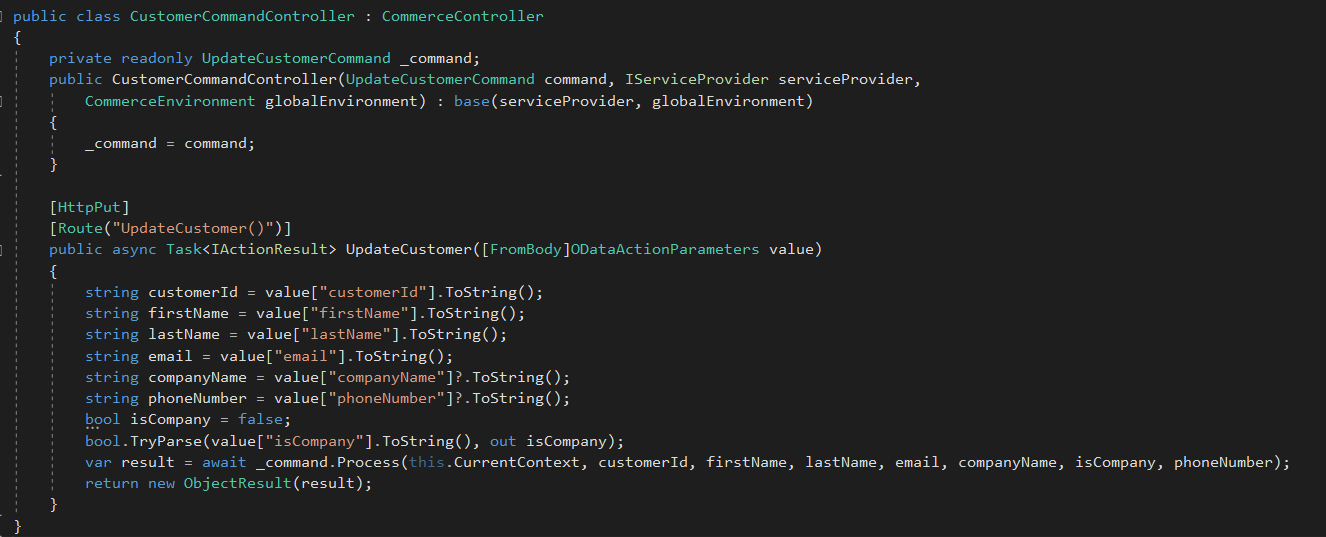
And a controller:


So we can say that xComerce part is done. Now we have to go to Sitecore side and try to receive new parameters.

Sitecore side:

Depend what your are doing, in our case it's customer so let's check registration controller which we use and would like to extend with custom fields. In our scenario is our custom controller written with some changes, which gets custom properties pushed by xCommerce in Customer component.


That's it. It's much more faster way to achieve customization of xCommerce entity - but remember that you are changing internal commerce files ! :)

Cheers!


3:34 PM

SUGPL#8 - xCommerce Speaker and organizator

It was time to start the new year with our Sitecore community! To do that we have organized new SUGPL meetup in Białystok.
Moreover, I was one of the speakers on this event, where I have presented xCommerce architecture which can be modified during customizations.


As we can see above I was the first presenter of this meetup. My main goal of the presentation was to let people know how xCommerce is built and where they can put own code to make it custom. What is the flow of xCommerce and how they can change it.

The second presentation was made by Artsem Prashkovich who described Sitecore Service Bus.


The third presentation prepared Jakub Koba who talked about Machine Learning in Sitecore


After charging of new knowledge as usual we have started SUGPL after party, where our guests from Belarus SUG join as well. Good time with excellent people, it's worth to repeat as many times as it can be!


Cheers!


12:06 PM

xCommerce Extending 1/3 - Overview

When we are working with Experience Commerce usually we are using SXA, CXA and entities already prepared for us by authors of this environment. It's a very pleasure way to build our solution with components which are out of the box.

But we have sometimes situation that our business requirement needs custom things like additional fields in forms or other places. In general, it needs to put own custom data inside already defined entities.

So what to do in this situation?

1. Code approaches

  • Composition
    • Entities can be extended by adding components to the Components property on the entity.
    • Components are just classes that are injected into the entity by a plugins with pipeline and blocks
    • It's a independent way to add something more, without relation to other plugin or other elements.
  • Policies
    • In simple understanding we can treat Policy like a config or setting file in some way. You can for instance add a new field for the customer entity etc.
2. UI approach - Composer

Since Sitecore Experience Commerce 9.0.2 is available new feature called "Composer". It's a tool which allow you to extend some entities from UI Dashboard

Let's take a look

1. At the beginning you are going to.... Merchandising tool , not composer ;). In that place you can create a new version of the entity

 2. After creation new version of entity you have unlocked rest of context menu, where you are able to create a new view for this entity


3.When you already have a new view, you can add a new property for this view to fill it. You can define there a name, but moreover a type. In this example I put string, but besides that you have:
  • DateTime
  • Decimal
  • Integer
  • Boolean


 4. Since we have already done new view with the property, we have to extract our custom view to a template, to share it e.g. for all sellable items. To make it we have special action in our context menu. Take a look:


5. Until now, when we did our template we should go to composer menu in xCommerce to manage this new 'item'.


6. When we click it and go inside we will see a new panel. It has also 3 additional button on the right side. There are actions which help you to use and share your custom view. They consist actions:
  • Manage Tags
  • Link to entity
  • Associate Items definitions

At the end, composer is a great tool when you need to add some custom properties especially in situation when you will use it later in this xCommerce dashboard.

But if you are looking more sophisticated solutions, check the next post, where you can find information about extending xCommerce from code perspective.

Cheers!