Sitecore tips and tricks and community news !

Post Top Ad

Post Top Ad

Showing posts with label sxa. Show all posts
7:02 PM

Automating SPE SXA sites cloning

Multisite approach is well known topic for all Sitecore guys. Not even for them (or us I should say :)), but also for also for marketing guys and every person which has connections with managing a big site.

Today I would like to say more about creating multisite solution in context of SXA. Each of us who worked with SXA had an opportunity to see cloning mechanism in Sitecore content editor which we can achieve from context menu. For everyone else it's look like:


When we are starting developing usually we operating with one site, which we are extending. But then come a moment when client needs more than one site. There is no a problem when we have to make 1,2 or 3 sites more. But question what if we need to create e.g. 25 new sites? Would you like to make it manually? :)
Moreover we can assume that it has to be done on more then one environment. It going to extend time or preparation this by manual work many times.

Answer for this issue and solution is to automate this action. As we hear many times, if you have to do something more than once, you should to automate this.

Basing on that and on SXA we can start to digging and creating a solution to make it happen!

Cloning site with SXA is nothing else than use already prepared Powershell scripts from SXA guys, which this cloning make true. Hence, we as a developers can use those scripts and make more complex and useful for us.

Scripts which are out of the box we can find here:


As you can see there is more scripts than we are looking for. Maybe it will be useful for you in the future. At this moment we will focus on SXA scripts and their cloning sites mechanism which are a bit below than last image shows.They are exactly here:
 
As we see, we have functions like "Copy-Site" or "Clone Site" which position which aggregates a functions from below node and represents context menu option. Let's check how does it look inside, what we can find here:

to better understanding lets put it in VS Code:


At first look we see usage of internal functions, managing dialog box etc. So right now we don't have any obstacles to make it something on our own.

Firstly let's think a bit and answer on question: How we will pass data to our new script? An idea could be prepare some csv file which you will iterate and in that way create as many sites as you want to have.

Additionally we can do some improvements and create already some languages, some accounts for new sites needs. In my example we have also some nodes aggregating sites to regions, but of course it is not necessary.
In that way we can define columns and below rows with values:

Then we can start to create some functions on our own which we will put to Modules and scripts nodes later in Sitecore. It will be done in the same way as e.g. SXA catalog is prepared but of course you can create you own catalog to make better separation. Take a look on below script. There you will find options for setting page designs etc. Maybe it will be some inspiration for your cases as well.
I hope so :) Enjoy !
Cheers !

12:43 PM

Sitecore 9.0.2 SXA 1.7.1 Azure PaaS ARM installation

During installation SXA 1.7.1 with Sitecore (in this case version 9.0.2) we have defined parameter which we have to fill in our module package in parameters file.
According to docs and default sitecore ARM templates those parameters are:

Ok, so we have them. So let's check what files we can download as a part of SXA scwdp packages:


So we see that we should also have "solrSupportSxaMsDeployPackageUrl". Where it is?
- Well, nowhere.

Why?
- Becuase it's not needed :) 

It was doing only thing like:


Since Sitecore 9.0.2 support Solr by default from ARM templates, additional packages since that version are not needed. In SXA version 1.8 is even removed. 
So, to omit that you can do something like:
"modules": {
  "value": {
    "items": [{      
        "name": "sxa",
          "templateLink": "new link"

I hope it will help,

Cheers!
 
12:10 PM

SXA - Custom Creative Exchange - Parallel team workflow

Recently SXA is getting much more popular in Sitecore development world. It's a natural way, because it brings many features and improvements which can help and mainly speed up process of creation site in Sitecore.

Usage SXA is also connected with changing workflow between particular parts of your team. Backend guys have to be aware of new tenants, themes, components, modules and other features which SXA provides. 
Frontend guys have to be aware of new HTML structure which by default brings SXA components for them. So they can focus only on styling elements on the page (Of course we can have custom things as well).

Hence, we see that now frontend part has to get in someway elements prepared by backend to style them. To do that SXA provides a default mechanism called "Creative Exchange" with the last version "Live".

What is it?

1. Default Creative Exchange approach:


In standard approach backend developer build site structure using components, but it doesn't have to be styled yet. After his job is done he export special package using Creative Exchange exporter for frontend guys.


They get this package where are *.sass and *.css styles files, HTML of components etc. They can now style components using mainly sass. After their work, they zip package once again and backend developer is importing this to the Sitecore, where Themes are updated with new styles.

It sounds really cool, but recently it has been even improved by the newest version "Creative Exchange Live" which work in real-time. 
It enables developers to modify themes and other site content without having to import the files back into the site. Creative Exchange Live works with Gulp tasks that enable you to make changes to themes and other content and synchronize to the Sitecore environment immediately.


It seems to be even better as I wrote, because we don't have to generate any packages.

But we still we have a few obstacles in the team which we can appear:

1. Whenever you have worked already with Creative Exchange or you haven't but you would like to try, potentially there is a risk to keep your friendship with frontend guys: You will ask why? Usually frontend guys love to build magic with the newest frontend technologies, which everyone knows how fast are changing. So creating CSS or sass for them is a bit obsolete.

2. If we use the older version (not "Live") we have to have this whole generating package process which can be inconvenient for people in the team

3. If we choose "Live" version everything work but in one scope of work, like one developer environment. It means it would be good if developer will be a full stack who will have a content and later will style that or it brings a need to install Sitecore, especially for frontend guys to let them use this real-time styling.

2. Our Custom Creative Exchange

Every path for above has some constraints. Because of that for our teamwork we prepared something new and special. Which will combine advantages of Live version but without need to install Sitecore on frontend guys environments, no generating packages etc. Let's take a look:

 
What we can see at first look is that comparing to default Creative Exchange, point of merging content and styles is moved to right side. It means that no more Sitecore is responsible for that, hence Sitecore is not needed for this and for frontend developers. Since now responsibilities connected with merging takes Apache server which was setup especially for that.

But how? from where it takes content?

Let's go through this flow:
  1. Setup backend devs and frontend devs in one network
  2. Frontend developer setup on his/her machine Vagrant environment which consists Apach server responsible for merging content with styles and whole frontend environment
  3. Backend developer does backend work, he prepared page with components on the page
  4. Frontend developer put in Apache config file IP of backend developer to whom wants to connect
  5. During making request to particular page from backend developer (where content has been created) Apache is filtering traffic according to predefined rules.
    1. If there is no connection to styles it brings content from particular machine which IP was used (backend guys for our example)
    2. If it's connected with styles, traffic is redirected to own frontend developer resources to get content from his/her styles files. 
So now I think that everything is clear.

Apache analyzes traffic send from frontend developer and decides from which source it has to get. If it's content case, it gets from an external machine, but if it connected with styling it redirects traffic and gets source from frontend machine.

It means that we:
- don't have to use packages
- don't have to install Sitecore for frontend guys
- have separated environments but still real-time connection between content and styles for frontends 

That's it! :)

Below I put config for virtual hosts in Apache


Cheers!
3:31 PM

xCommerce - Extend Storefront scaffolding! - Overview


Hi all,

I think that many of you had a chance to work with SXA Storefront connected with xCommerce solution provided in Sitecore 9.0.2.

With the box we get also whole Storefront solution which helps especially during first contact with xCommerce. It provides for us a lot already prepared sites with mechanisms which allow xCommerce capabilities.

One of the this Storefront feature is scaffolding plan. This mechanism allows for editors to create a new site in Sitecore with sites, datasources etc. already prepared. It helps to skip re-creating content items each time for a new site, hence it reduces amount of work significantly.

By default Sitecore xCommerce SXA scaffolding prepare for us below structure:

We see how many things we get out of the box in this scaffolding.

But right now we should have ask a questions:

"It's so cool, but what if I have multisite solution and for instance each market has own site and I would like to:
- share my custom component during creation of a new market (new site)? 
- add a new page to this structure during site creation
- link custom datasource to some component during site creation

Is it possible?"

Yes, it is !

You can create you own scaffolding plan or modify current one.


It is also worth to mention that there is no only one scaffolding plan in whole project. There is a few of them. You can find components plan, templates or foundation tenants plan as well.

Under the path: "/sitecore/system/Settings/Feature/Commerce Experience Accelerator/Storefront Components/Storefront Components Scaffolding Plan" you will find item component scaffolding plan:


But for instance if you will check path like: "/sitecore/system/Settings/Project/Commerce Experience Accelerator/Storefront Template Scaffolding Plan" you will find template scaffolding plan:


Very nice feature which is not easy to find is editor of this plan. To check it we will go to the components scaffolding plan. Now it's available after mouse right click as it is shown on below image:


When you click it window is opening and you have something looks like that:


Moreover, scaffolding plan are not only items which are in Sitecore to service thich functionality. There has to be some more structure to let it work in some way. So when we will dig one layer below we will find items called - Scaffolding Item Plan File which exists in Media library under the path:
"/sitecore/media library/Files/Scaffolding Plan Files/"

 
Now we can see there is more than one scaffolding plan file item, what means that there is more scaffolding plans.

But you will ask at this moment:

"Robert, but what information keeps this file?"

What is very good question! Well, this file is a JSON file, which keep all information about the items and structure which has to be created. It is kind of snapshot of each item in JSON.
It's generated based on Branch templates which are located in the similar structure like scaffolding plans items. So if we would like to check templates plan it will be like:


Mentioned JSON file:

How it works?

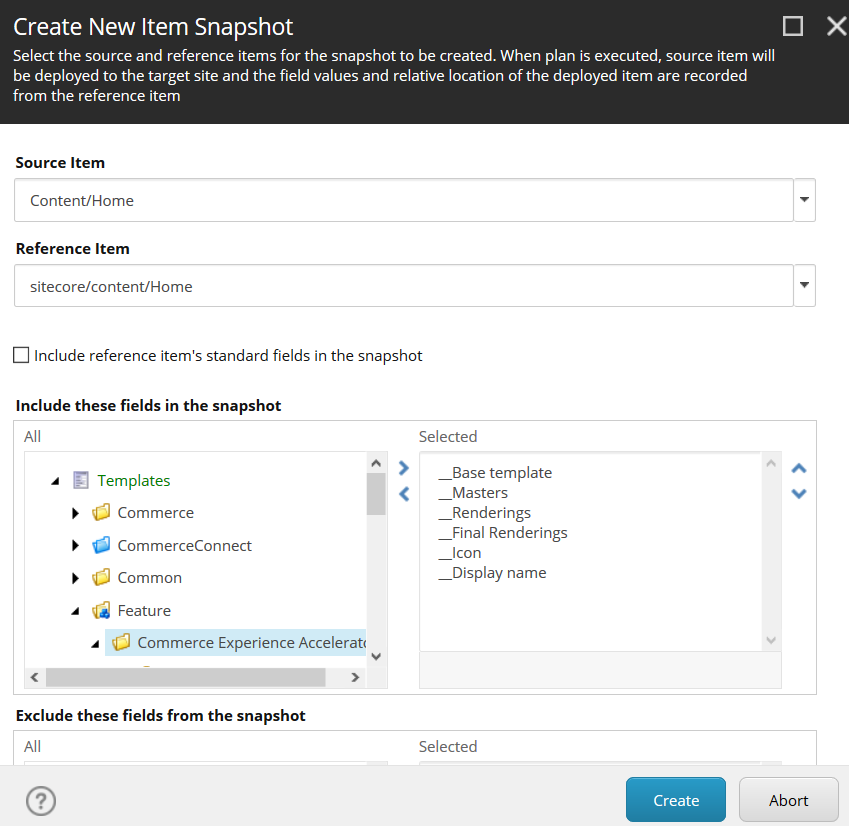
Well to make it possible we have to select 2 things for scaffolding plan:
  • Source item
  • Reference item
Source Item - is an item from branch templates which define structure for the item which has to be created during scaffolding process.

Reference Item - is an item from content node, which currently exists and which will deliver values for the new item, which will be created based on source item (branch template).
During creation new site, scaffolding mechanism gets

I think that more it can be more clarified when we take a look on the image below, which shows window during editing component scaffolding plan:


So, what we have under the hood?

The main point in mentioned previously JSON file is special attribute/tag (whatever we will name it) - "dynamic".
This tag is sort of mock which cover place which will be replaced by the new ID during creation of new item during scaffolding process. Let's take a look on some row:


Now it should be more clear for everyone :)
How we can customize it ?
 
Like I wrote at the beginning there is a few options, you can modify current items, you can add own plans. You can do it only for templates or maybe for the components. You can even write your own Powershell script and generate this scaffolding plan file in JSON. Then just assign this file to some plan and it's done.

Because in this post we have made sort of overview and general description, example of customization we will do in next blog post.


Stay tuned ! :)


Hope it will help you ! :)