Sitecore tips and tricks and community news !

Post Top Ad

Post Top Ad

Showing posts with label extend. Show all posts
8:27 PM

xCommerce - extend by composition 3/3

So here we are with the next and the last one part of our journey through xCommerce customization path. Now we will take a look on the most proper way to make xCommerce fit to us - composition.


In this way we have to understand how xCommerce solution is build. It has (like Sitecore) own hierarchy flow to process the request. To handle it it uses a few steps:

  • Plugins
  • Controllers and Commands
  • Pipelines
  • Blocks
Let's take a look a bit on them.

 Plugins
  • Independent features
  • Only accepted way to extend Commerce Engine
  • Don’t remove default ones just like that ;)
Controllers & Commands


  • Controllers works in the same way as usuall
  • Commands are invoking inside the controllers
  • Commands invokes Pipelines
 Pipelines


  • You can create your own pipelines and hook into pipelines defined in other plugin
  • Similar to standard Sitecore pipeline mechanism
  • In SXC9 they are in the code not XML
  • Aggregate SXC Blocks
  • Comparing to XML approach No „ShowConfig.ASPX” but JSON preview
  • In Commerce, there is no config patching facilities. Instead we can create our custom plugin and can patch our Blocks through the code.
     
 Blocks


  • Equivalent for Sitecore processors
  • Chaining calls
  • Remember about returning element
Take a look on this examples of adding blocks in a few several ways:


Example

Let's assumme that we have sort of new functionality like subaccounts. To make it work properly we have to add a new controller, command, pipeline and some blocks. To achieve that we have below actions:

  • Controller
  • Command
  • Pipeline
  • Blocks
We also should remember about mentioned earlier registration piplines and blocks in the configuration classes. You will have it also below in the examples of code.
Enjoy!
11:57 AM

xCommerce Extending 2/3 - Policies


At this point we already have known general overview of ways which are possible to extend or customize xCommerce. We did extension of an entity via xCommerce composer tool. But we also have mentioned that there are ways to customize platform from code. We saw 2 main ways, by Policies and Composition, what means the best way - to create independent plugins.

Let's take a look on both of them.

At the beginning what you need is:

Sitecore Commerce Engine SDK, example:


1. Policies

By definition:

A named, versionable and variable set of data that can be used as facts within behaviors to influence behavioral outcomes. source

Policies is the simplest I think approach, but we should avoid using it. Why? Because it has an influence on internal xCommerce code, which can be changed e.g during upgrade. To have less stress and work we shouldn't touch internal xCommerce thing but extend it via composition approach.

Policies you can find in this place inside the SDK solution


Let's assume that we would like to extend our Customer entity. What we should to do is to find this entity in policies and add your custom field.


Yes, we did it! we have added a new property! Is it enough?
- Well, not exactly. We still need create a way to make it visibile outside.

But how to do that?

You still (like in a composition) create you feature project (plugin) and define there a few elements of your change. But...it's still less work than in composition. Usually, needed for you would be , command and controller. In policies like in composition approach your are adding new properties of entity as a new components. Difference is that, when you are changing policy this components are higher in hierarchy of childviews of your entity and you don't have to do much, to later gets them in Sitecore.
By composition approach those components will be buried much more lower to get it.

Now we understand that we have to think about chain of commands and controllers which uses it in xCommerce and extend those places with our custom property. Hence you have to think where you should to go to. To make it very useful is DotPeek, where you can find whole process flow.

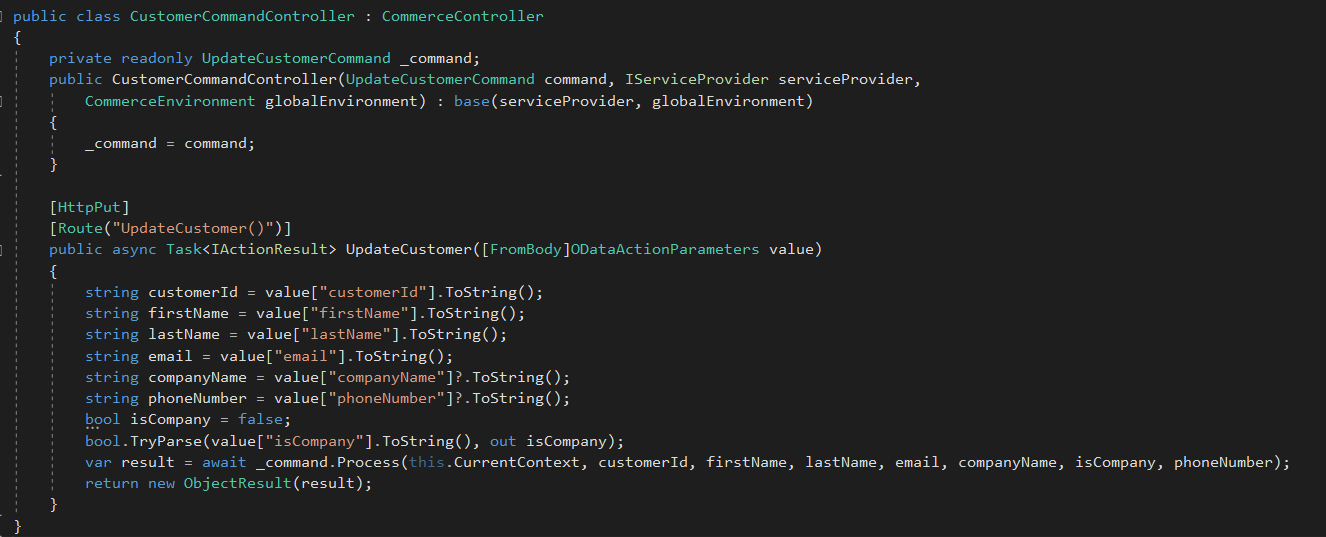
Some custom command to make possible to get it like:


And a controller:


So we can say that xComerce part is done. Now we have to go to Sitecore side and try to receive new parameters.

Sitecore side:

Depend what your are doing, in our case it's customer so let's check registration controller which we use and would like to extend with custom fields. In our scenario is our custom controller written with some changes, which gets custom properties pushed by xCommerce in Customer component.


That's it. It's much more faster way to achieve customization of xCommerce entity - but remember that you are changing internal commerce files ! :)

Cheers!


3:34 PM

SUGPL#8 - xCommerce Speaker and organizator

It was time to start the new year with our Sitecore community! To do that we have organized new SUGPL meetup in Białystok.
Moreover, I was one of the speakers on this event, where I have presented xCommerce architecture which can be modified during customizations.


As we can see above I was the first presenter of this meetup. My main goal of the presentation was to let people know how xCommerce is built and where they can put own code to make it custom. What is the flow of xCommerce and how they can change it.

The second presentation was made by Artsem Prashkovich who described Sitecore Service Bus.


The third presentation prepared Jakub Koba who talked about Machine Learning in Sitecore


After charging of new knowledge as usual we have started SUGPL after party, where our guests from Belarus SUG join as well. Good time with excellent people, it's worth to repeat as many times as it can be!


Cheers!


12:06 PM

xCommerce Extending 1/3 - Overview

When we are working with Experience Commerce usually we are using SXA, CXA and entities already prepared for us by authors of this environment. It's a very pleasure way to build our solution with components which are out of the box.

But we have sometimes situation that our business requirement needs custom things like additional fields in forms or other places. In general, it needs to put own custom data inside already defined entities.

So what to do in this situation?

1. Code approaches

  • Composition
    • Entities can be extended by adding components to the Components property on the entity.
    • Components are just classes that are injected into the entity by a plugins with pipeline and blocks
    • It's a independent way to add something more, without relation to other plugin or other elements.
  • Policies
    • In simple understanding we can treat Policy like a config or setting file in some way. You can for instance add a new field for the customer entity etc.
2. UI approach - Composer

Since Sitecore Experience Commerce 9.0.2 is available new feature called "Composer". It's a tool which allow you to extend some entities from UI Dashboard

Let's take a look

1. At the beginning you are going to.... Merchandising tool , not composer ;). In that place you can create a new version of the entity

 2. After creation new version of entity you have unlocked rest of context menu, where you are able to create a new view for this entity


3.When you already have a new view, you can add a new property for this view to fill it. You can define there a name, but moreover a type. In this example I put string, but besides that you have:
  • DateTime
  • Decimal
  • Integer
  • Boolean


 4. Since we have already done new view with the property, we have to extract our custom view to a template, to share it e.g. for all sellable items. To make it we have special action in our context menu. Take a look:


5. Until now, when we did our template we should go to composer menu in xCommerce to manage this new 'item'.


6. When we click it and go inside we will see a new panel. It has also 3 additional button on the right side. There are actions which help you to use and share your custom view. They consist actions:
  • Manage Tags
  • Link to entity
  • Associate Items definitions

At the end, composer is a great tool when you need to add some custom properties especially in situation when you will use it later in this xCommerce dashboard.

But if you are looking more sophisticated solutions, check the next post, where you can find information about extending xCommerce from code perspective.

Cheers!
3:31 PM

xCommerce - Extend Storefront scaffolding! - Overview


Hi all,

I think that many of you had a chance to work with SXA Storefront connected with xCommerce solution provided in Sitecore 9.0.2.

With the box we get also whole Storefront solution which helps especially during first contact with xCommerce. It provides for us a lot already prepared sites with mechanisms which allow xCommerce capabilities.

One of the this Storefront feature is scaffolding plan. This mechanism allows for editors to create a new site in Sitecore with sites, datasources etc. already prepared. It helps to skip re-creating content items each time for a new site, hence it reduces amount of work significantly.

By default Sitecore xCommerce SXA scaffolding prepare for us below structure:

We see how many things we get out of the box in this scaffolding.

But right now we should have ask a questions:

"It's so cool, but what if I have multisite solution and for instance each market has own site and I would like to:
- share my custom component during creation of a new market (new site)? 
- add a new page to this structure during site creation
- link custom datasource to some component during site creation

Is it possible?"

Yes, it is !

You can create you own scaffolding plan or modify current one.


It is also worth to mention that there is no only one scaffolding plan in whole project. There is a few of them. You can find components plan, templates or foundation tenants plan as well.

Under the path: "/sitecore/system/Settings/Feature/Commerce Experience Accelerator/Storefront Components/Storefront Components Scaffolding Plan" you will find item component scaffolding plan:


But for instance if you will check path like: "/sitecore/system/Settings/Project/Commerce Experience Accelerator/Storefront Template Scaffolding Plan" you will find template scaffolding plan:


Very nice feature which is not easy to find is editor of this plan. To check it we will go to the components scaffolding plan. Now it's available after mouse right click as it is shown on below image:


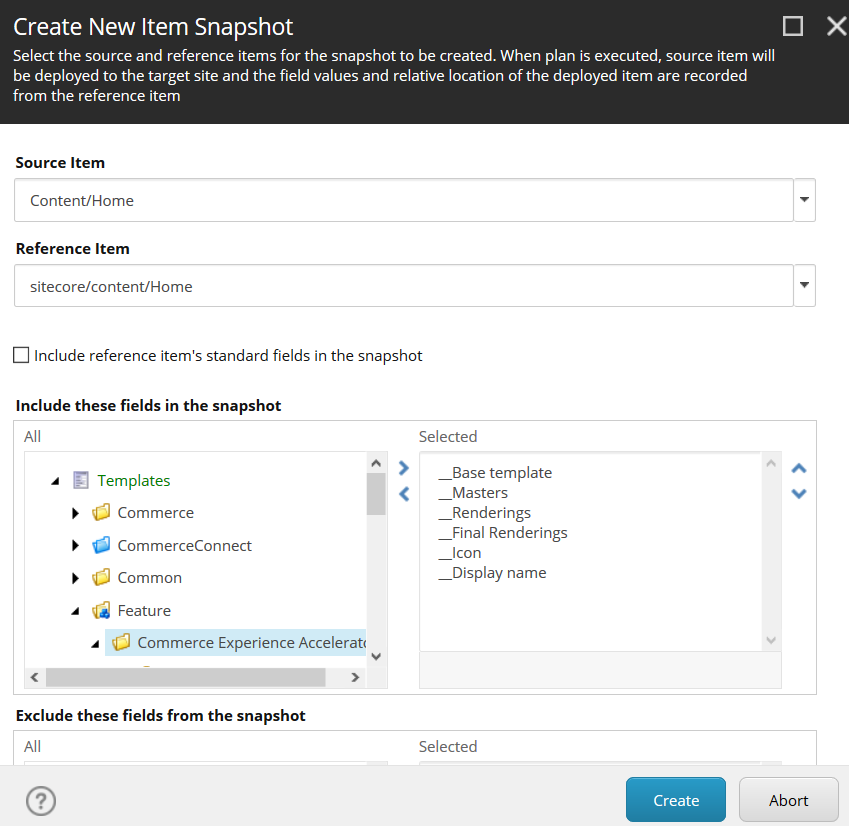
When you click it window is opening and you have something looks like that:


Moreover, scaffolding plan are not only items which are in Sitecore to service thich functionality. There has to be some more structure to let it work in some way. So when we will dig one layer below we will find items called - Scaffolding Item Plan File which exists in Media library under the path:
"/sitecore/media library/Files/Scaffolding Plan Files/"

 
Now we can see there is more than one scaffolding plan file item, what means that there is more scaffolding plans.

But you will ask at this moment:

"Robert, but what information keeps this file?"

What is very good question! Well, this file is a JSON file, which keep all information about the items and structure which has to be created. It is kind of snapshot of each item in JSON.
It's generated based on Branch templates which are located in the similar structure like scaffolding plans items. So if we would like to check templates plan it will be like:


Mentioned JSON file:

How it works?

Well to make it possible we have to select 2 things for scaffolding plan:
  • Source item
  • Reference item
Source Item - is an item from branch templates which define structure for the item which has to be created during scaffolding process.

Reference Item - is an item from content node, which currently exists and which will deliver values for the new item, which will be created based on source item (branch template).
During creation new site, scaffolding mechanism gets

I think that more it can be more clarified when we take a look on the image below, which shows window during editing component scaffolding plan:


So, what we have under the hood?

The main point in mentioned previously JSON file is special attribute/tag (whatever we will name it) - "dynamic".
This tag is sort of mock which cover place which will be replaced by the new ID during creation of new item during scaffolding process. Let's take a look on some row:


Now it should be more clear for everyone :)
How we can customize it ?
 
Like I wrote at the beginning there is a few options, you can modify current items, you can add own plans. You can do it only for templates or maybe for the components. You can even write your own Powershell script and generate this scaffolding plan file in JSON. Then just assign this file to some plan and it's done.

Because in this post we have made sort of overview and general description, example of customization we will do in next blog post.


Stay tuned ! :)


Hope it will help you ! :)